Professional eBay listings typically include clear product images, detailed descriptions, consistent branding, mobile-friendly layouts and accurate product information.
Archives: FAQs
Why are mobile-friendly eBay listings important?
A large percentage of eBay buyers shop using mobile devices. Mobile-friendly listings help ensure your products are easy to view and navigate regardless of screen size.
Do professional eBay listings increase sales?
Professional listings help build trust with buyers by presenting products clearly and consistently. While no software can guarantee sales, well-presented listings often perform better than poorly formatted alternatives.
Can HeroLister help improve my eBay listings?
HeroLister helps sellers create professional, mobile-friendly listings that improve presentation and buyer confidence. Better listings can lead to stronger engagement and potentially improved conversion rates.
What is eBay SEO?
eBay SEO refers to optimising your listings so they appear higher in eBay search results. Factors such as listing titles, item specifics, images and listing quality all contribute to visibility.
Are HeroLister templates compliant with eBay rules?
Yes. HeroLister templates are designed to comply with eBay’s current listing requirements, including active content restrictions and mobile-friendly guidelines.
Are HeroLister templates mobile-friendly?
Yes. All HeroLister templates are designed to work across desktop, tablet and mobile devices, helping buyers view your listings clearly regardless of how they shop.
Do I need coding experience to use HeroLister?
No. HeroLister is designed for eBay sellers of all experience levels. You can create professional listings without needing HTML, CSS or technical knowledge.
How does HeroLister work?
HeroLister allows you to choose a professional eBay listing template, add your product information and generate a finished listing in minutes. No coding or design experience is required.
What is HeroLister?
HeroLister helps eBay sellers create professional, mobile-friendly listing templates without needing coding or design skills.
Simply choose a template, add your product information, customise the design and generate your listing in minutes. HeroLister is designed to help sellers create more professional listings, improve buyer confidence and save time when listing products on eBay.
How to add more photos to template
You can add this in tempalte description section by pasting code below to generated template code:
<img src=”ADD_HERE_YOUR_LINK_TO_TEMPLATE” style=”max-width: 100%; height: auto;”>
ADD_HERE_YOUR_LINK_TO_TEMPLATE – here you must paste your link to photo, you will need photo hosting or you can use ebay photo hosting after publish listing copy ebay hosting photo url.
This code add responsive photo in section where you paste in our template.
How to add Item Description on mobile?
Ebay allows customizing short Item Description on mobile.

By default, in our all templates, this is the text from the Description Section.
Example in TU05:
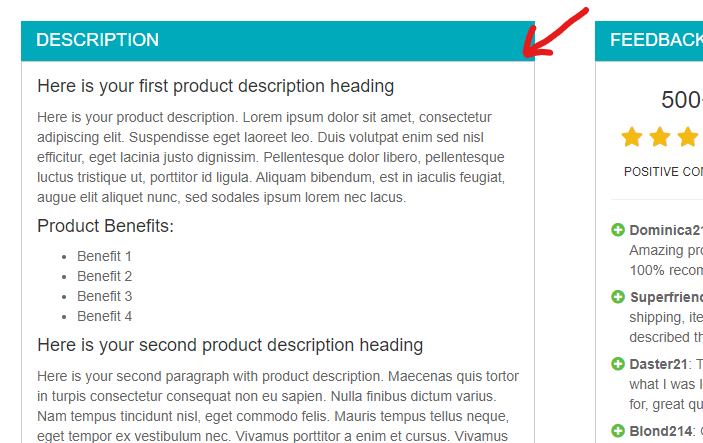
Ebay get automatically 800 first characters from text in this section.
Remember, each new line is like 50 characters.
More info you can find on Ebay site:
https://pages.ebay.com/sell/itemdescription/customizeyoursummary.html
How to move to ebay get text from different pleace?
To do this, after you generate code in herolister you need to move the selected code to a different place.
Remember when pasting this code do not leave any space between characters

I can’t upload a photo
Please check format of your photos.
We recommended PNG or JPEG or JPG format.
Also, max upload photo size is 1MB (because bigger photos are not recommended, bigger photos will be slowly loadings).
If you know how to fast resize your photo please read here.
Do the templates have active content?
No templates do not have active content (ebay not allowed this). All templates is fully compatible with ebay rules, and if ebay something change we will prepare for this our template.
Too big white space (or margin) around my images in template
If you have too big spaces around your photos in the template you should resize your photo to smaller or do the same resolution for all photos in the gallery.
For example too big logo (you should do logo smaller):
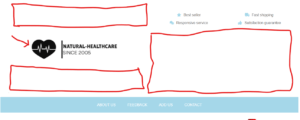
For example different photo resolutions in gallery (you should do all photos the same resolution):

How to resize your photos?
How can i change or add ebay user id?
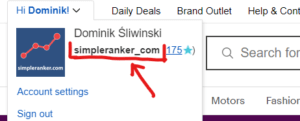
You can change your eBay user ID (it’s required if you create a template), after log in to your account next go to my account -> My ebay accounts.
This is your ebay user id:
Can I recommended my second account?
No, it is forbidden you cannot recommend yourself.
We check all data before payout.
Also, to withdraw your money in your history you need to have a minimum of 2 different customer recommendations (completed payment).
Are there any minimum requirements to get money?
The minimum amount to withdrawal is $10.
Also in your referrals history, you need to have a completed order minimum from 2 people, we do this because we want to avoid referrals by yourself.
How will I be able to withdraw my money
At the end of the month, we will send you money to your Paypal account.
In the registration form, you need to add “Payment Email”, there we will send you money.
You can change your “Payment Email” also later in your affiliate (referral) panel, you can do this in the settings tab.
Due to the fact that we have a refund guarantee where the customer can get a refund within 90 days, your money will be available for withdrawal only after this time.
You can read about our refund terms here.
How does an affiliate referral link work?
A referral link is the URL affiliates use to promote our website.
You will find this link after login into your affiliate area.
The link has the affiliate ID or username appended to the URL, so a specific affiliate can be tracked when a visitor or customer visits our website.
If the customer in 30 days set up a subscription (in the pricing tab, and then he does the checkout process) you will get a commission for every completes payment.